The Google File System (GFS)
A comprehensive breakdown of the historic 2003 GFS paper.
---

Abstract
This blog covers fundamental and important topics related to The Google File System paper published in 2003. I will try to cover everything from the ground up.
You don't need to have any prerequisite knowledge to understand the blog itself, but some coffee and motivation is appreciated.
Let's start from the basics.
What is a Distributed File System?
In computing, a file system or filesystem (often abbreviated to FS or fs) governs file organization and access. - Wikipedia
The purpose of a file system is to provide abstract view over the physical data stored on a disk. Windows uses NTFS, Linux uses ext4, btrfs, etc. This are examples of a local file system, because all of the files are available on a single machine.
In contrast, Distributed File System is shared over multiple machines. Some files might resides on machine A, and other on machine B.
Why do you need one?
Performance
By distributing the file system across machines, overall performance of the system is increased. Instead of one machine handling all the operations like creating a file, reading it or updating it. The workload is now distributed across multiple machine.
Reliability & Availability
System can replicate files across multiple machines, which makes the system more reliable, and less susceptible to data loss and corruptions. Similarly, when the user request some file and if the machine A goes down, the system can serve the request from machine B.
Scalability
In local file system, single machine was bottleneck. A single machine can process requests till certain limits no matter how much you scale it vertically. By sharing the file system across machine, the system becomes more scalable. New machines can be added easily in DFS (Distributed File System).
The Google File System
The GFS (Google File System) was initially created as backend file system for google's production systems, which later evolved and started being used for analytics, research and development. Enough yapping, let's take a look into the design & architecture.
Design Decisions
GFS was designed for the google's application workload. Their workload required,
- Fault-Tolerance, because, they used inexpensive commodity hardware that fails often.
- Large multi-GB files, rather than few small KB files.
- Sequential appends to files are more often than few random writes.
- Supporting concurrency with low synchronization overhead.
- High Bandwidth, than lower latency
- Relaxed Consistency
With this key designs in mind. Let's take a look at the core architecture.
Architecture
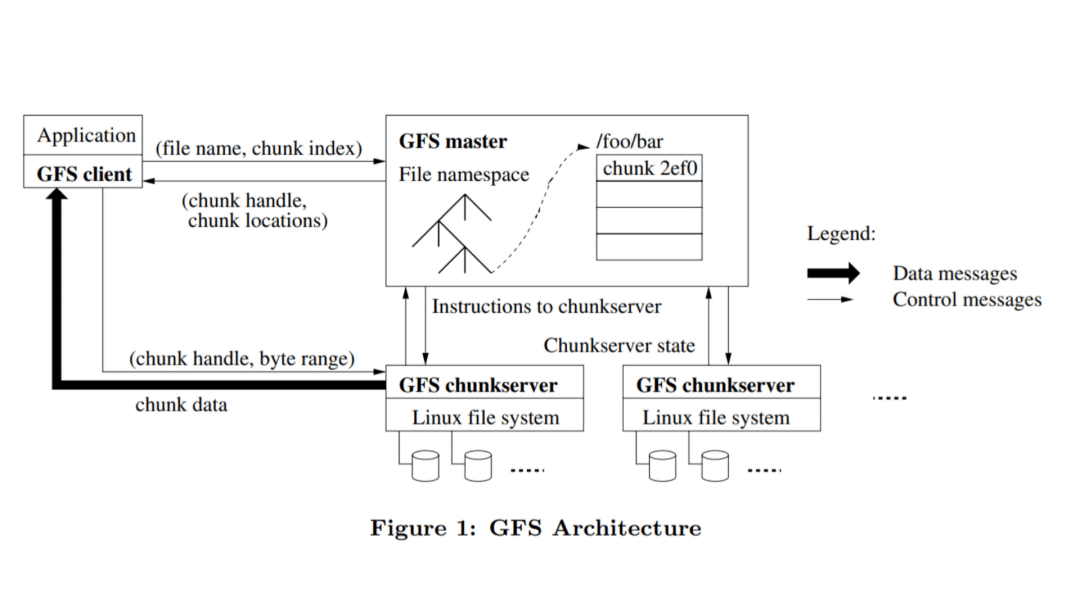
A GFS cluster contains a single Master, several chunkservers and clients. Master and chunkservers are Linux user-level process.
Each file in GFS is represented as multiple fixed-size chunks (typically 64MB), each chunk have a globally unique chunk handle. For reliability, all the chunks are replicated across chunkservers with replication factor of 3 by default.
The master orchestrates all the operation like creating file chunks, deleting unnecessary chunks, chunk lease management and maintaining metadata about files. Master keeps all the information about the system in main memory(RAM) and does not interact with the chunks directly. Chunkservers are the ones who manages the chunk.
To interact with the filesystem, GFS Client is attached to each application, which communicates with the master and chunkservers to perform application tasks.
Why Chunks of 64MB?
By default GFS divides files into 64MB chunks, which gives us following benefits,
- Since each chunk's metadata is stored in the master's main memory, larger chunk sizes produces less metadata to manage.
- If the application wants multiple updates in single chunk, larger chunk size allows less interaction with the master for fetching metadata about different chunks.
- Clients can make a persistent TCP connection to the chunkserver and perform multiple taks within the same chunk and reduce network overload.
Is Master a Bottleneck?
One key decision in the master design is that, all the metadata about the chunks are stored in the master's main memory(RAM). Meaning, the filesystem's capacity is limited by the memory of the master??
Yes, but the paper describes that the master maintains less than 64 bytes of metadata for each 64MB chunk. Hence, with only 8GB of main memory the upperbound on how much data that can be stored in a single GFS cluster will be,
8PB of data with only 8GB of main memory on a single cluster is surely not a bottleneck.
The master employs various technique to ensure only 64B are required for storing the metadata. e.g, Prefix compression for storing the file.
Master Failure and Recovery
To tolerate master crashes, the master maintains an Operation Log. Operation Log is a simple AOF(Append Only File), which is updated whenever the metadata about files changes. It is also periodically persisted on the local disk and remote servers for availability. In case of master crash, the master just replays all the logs in sequence and recover its original state.
Recovering from a long Operation Log is redundant and slow. So, the master creates checkpoints after Operation Log crosses certain size. Checkpoints are int B-Tree like form which can be easily mapped in the memory when recovering. Checkpoints are also replicated on remote machines.
Filesystem Interactions
This section contains information on how GFS client interacts with the filesystem for operations like read, append, write & delete.
Reads
-
When the application want to read for a specific byte offset from a file, the GFS client translates the byte offset into a chunk index (1) and send the request to GFS master.
-
GFS Master responds with a chunk handle (64 bit unique identifier) and locations of the chunk replicas.

- GFS client caches this response for some period of time to save a round-trip from fetching the same metadata again. With the location of the chunk replicas, client can now make request to any one replica with chunk handle and byte range to read from that chunk.
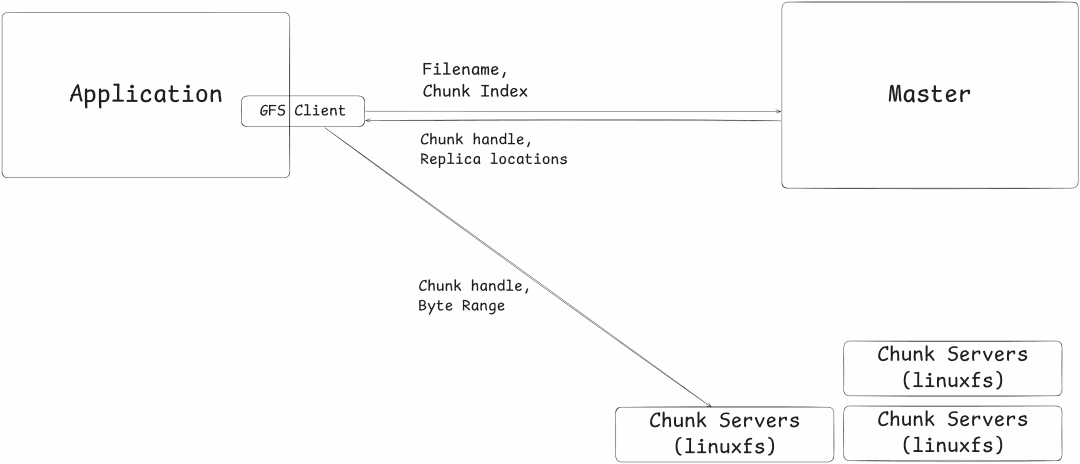
For every subsequent request to the same chunk, client don't need to request the master for replica locations. Instead, it can use the client cache.
Writes
Writes in GFS are little complex, because it includes chunk lease management for supporting concurrent writes.
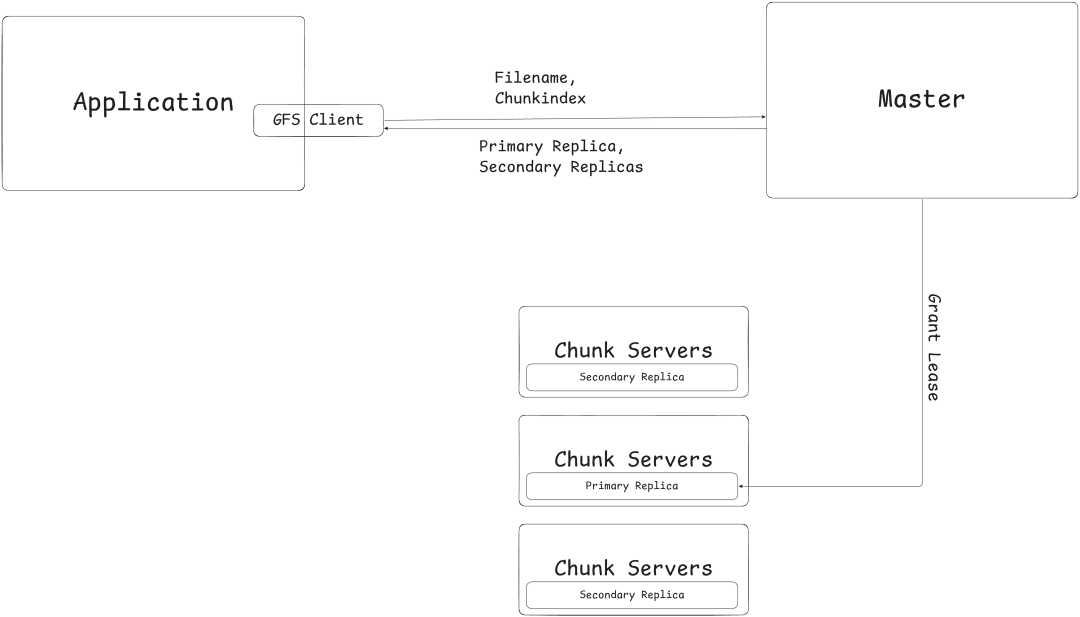
When a GFS client wants to write to a particular chunk, the chunk needs to be leased by one replica of that chunk. The replica which holds the lease for a particular chunk is called Primary Replica. A chunk can only have one Primary Replica. But a chunkserver can have multiple Primary Replicas which corresponds to different chunks. All of the lease information is stored in master's main memory.
Let's take a look at how a typical write operations is performed,
- GFS client requests the master for writing to a file with the filename and its chunk index (1). The master returns the primary and other replica (secondary) locations, if a replica already holds a lease for that chunk, otherwise the master grants one replica a lease.
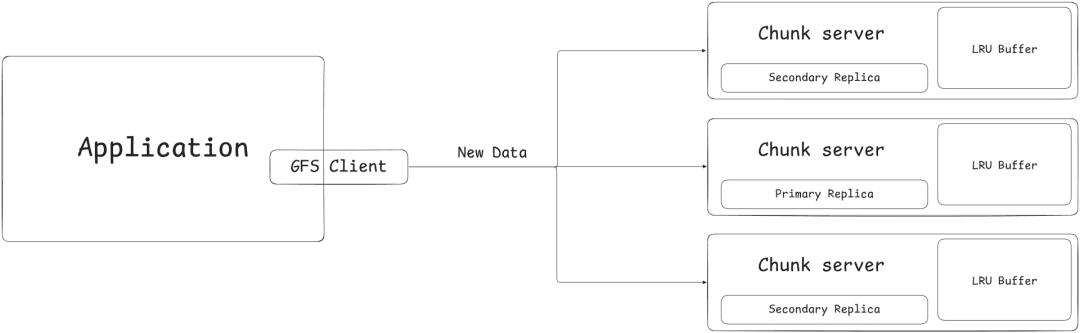
- GFS client pushes the new data to all the chunk replicas, and the chunkserver holding the replica stores the data in its LRU buffer and returns acknowledgement to the client. The data is still not written to the disk.
- A write request to the primary replica is sent. The primary replica creates a serialized order of mutation which is called Mutation Order. It applies the mutation on its disk according to the order and forwards the mutation order to all other secondary replicas. Secondary replicas applies mutations as per mutation order and returns back acknowledgement. Any error occurred during this step, results in the request being failed and then retried again by GFS client from step 2.
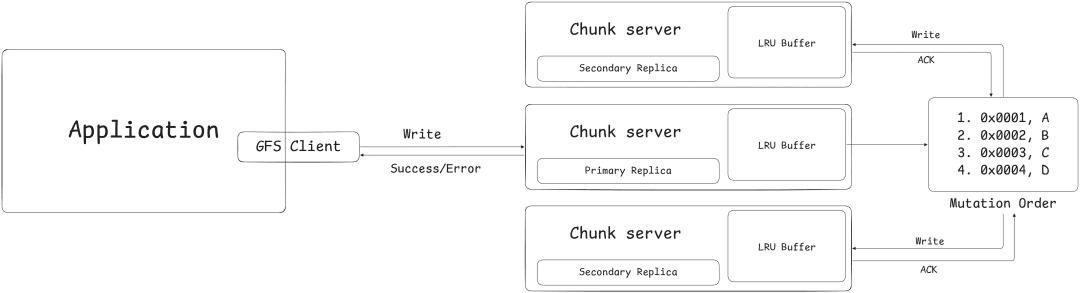
Mutation Order created by the primary replica is applied as is to all the secondary replica. Meaning that the secondary replica will write at the same byte offset as primary replica did.
You may have a question, if the primary replica and some subset of secondary replicas applied the mutation and the remaining replicas failed, doesn't the replicas became inconsistent?
Yes, more on that later.
Record Append
Record append is used to append data to the end of the file at-most-once atomically.
The only difference between traditional writes and record append is that, GFS client doesn't need to specify byte offset, it is automatically chosen by GFS and sent to the client.
When appending primary replica handles cases that exceeds the chunk's maximum size. Otherwise, all the steps are same as writing.
Inconsistent Updates
GFS have relaxed consistency, meaning the data will not be exactly byte-wise similar on all of the replicas. Let's take a look at how the data will become inconsistent after performing some record append operations.
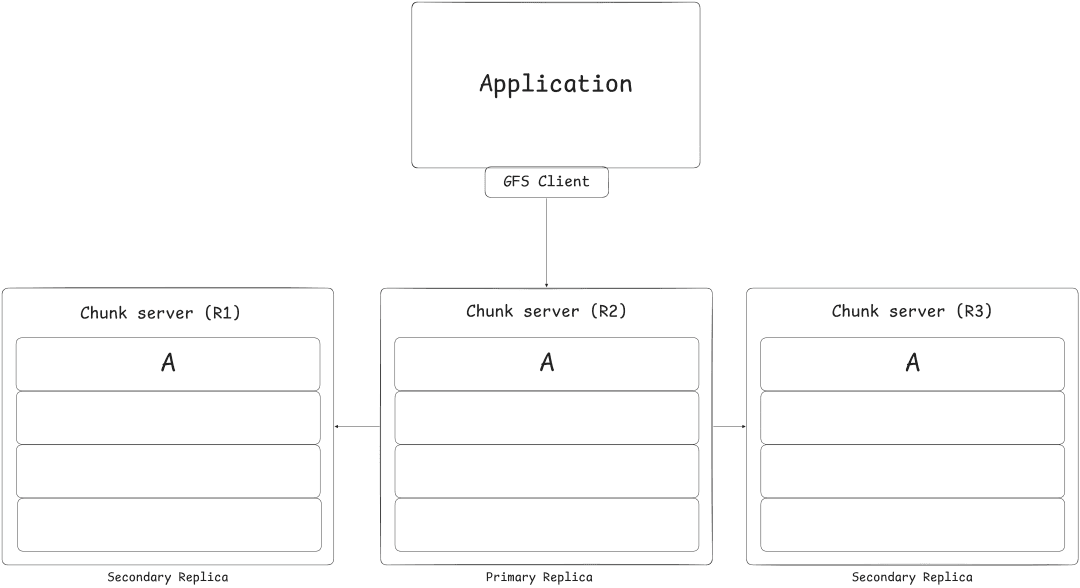
A client requests record append on some file and the record append might apply to all replicas R1, R2 and R3 of the last chunk of that file.
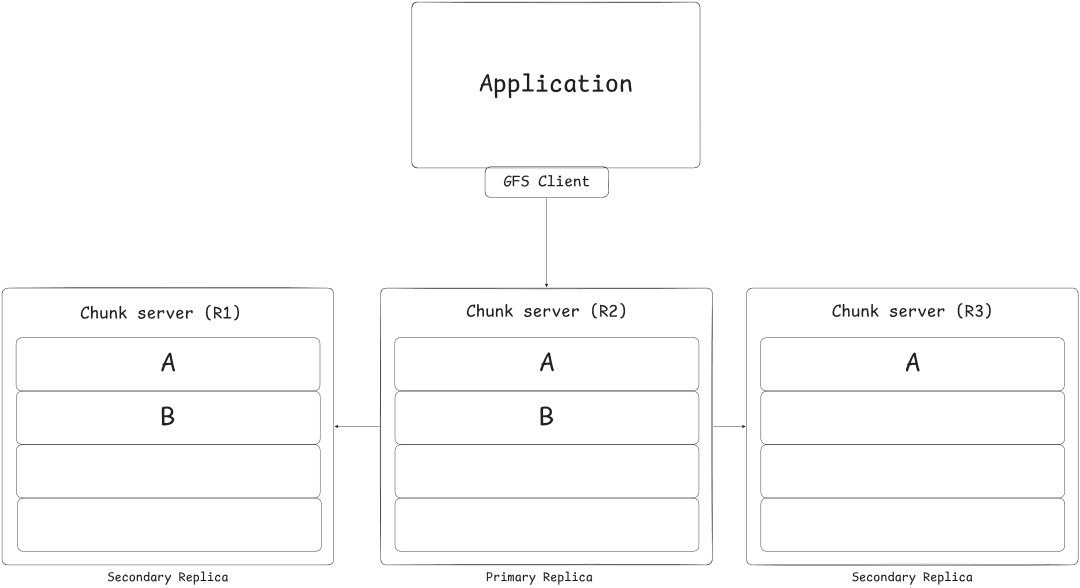
Client requests another record append but, this time it only applies to the primary (R2) and one secondary (R1) replica. The third replica (R3) fails while appending making the overall operation report an error to the client.
Because the record append failed, client might retry the operation and it may succeed this time, resulting in the following replica state.
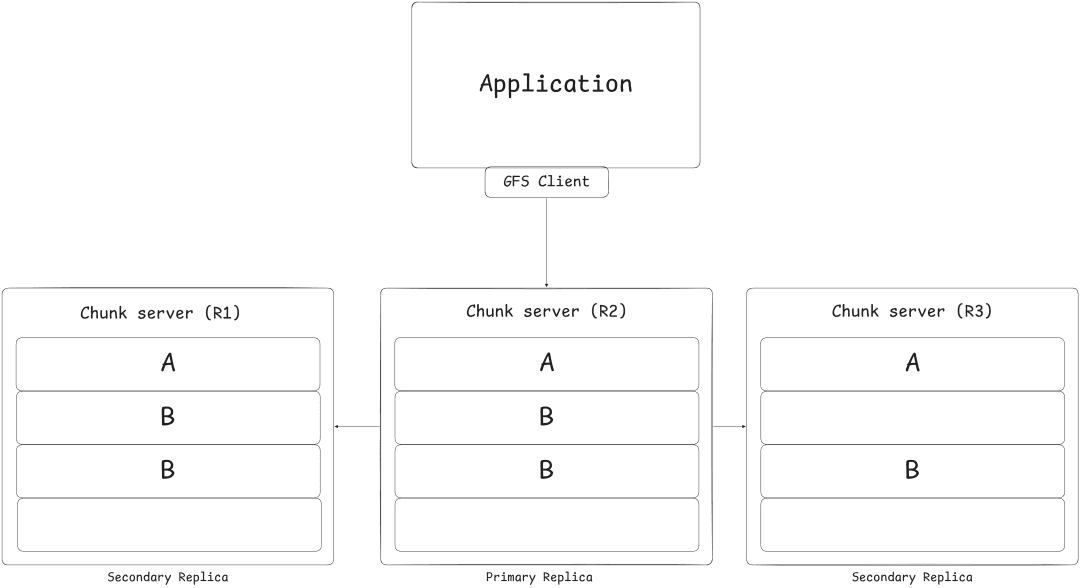
As you can see, the replicas are not byte-wise same. There are duplicates in replica R1 and R2 and a padding in R3.
Successful record appends results in consistent state, but the intervening regions are left inconsistent. The paper describes few ways to detect this on the client side, which you can further read.
Deletes
When the GFS client sends a file deletion request, the master immediately logs it in its operation log and renames the file to a hidden name.
The file is still kept on the disk with hidden name till three days by default. Until then, the file can still be read and undeleted by renaming.
After three days the master removes related metadata about the files and allows the chunkserver to reclaim the space.
Conclusion
I've tried to cover all the fundamental & important topics, but there is still lot more to learn like,
- Namespace management & locking,
- Replica optimizations,
- Garbage collection,
- Availability optimizations,
- Data Integrity,
- and more...
If you have read the blog till here, give the original paper a read. I assure you, you will learn something new at the end.
A lot of google's internal operations and research was done on top of GFS after successfully implementing it in the production systems like, MapReduce. GFS was massively successful piece of technology in the industry at the time. It doesn't innovated something new, rather created a robust system with already found technologies. Google has replaced GFS with Colossus, with improvements in fault-tolerance and the master performance.
Email me if you have any questions or corrections regarding the blog.
Follow me on X(Twitter) at @bdevanshh